Search that finds the sale, even with a typo.
Joy Search takes over your store's search box with a full-screen, typo-tolerant, filterable search panel. Merchandising rules, learning ranking and search-to-sale analytics run inside Shopify admin, with no code in your theme.
14-day free trial on every plan. Works on all Shopify plans, no Shopify Plus needed.
Built for the Problems Store Owners Actually Complain About
We studied how merchants use search apps day to day and designed Joy Search around the four things that go wrong most often.
Search That Survives Theme Updates
Joy Search installs as a theme app embed and detects your search box automatically. No CSS selectors to paste, no snippet to maintain. If the connection ever drops, the dashboard tells you and shows the fix.
Every Search Counted as Revenue
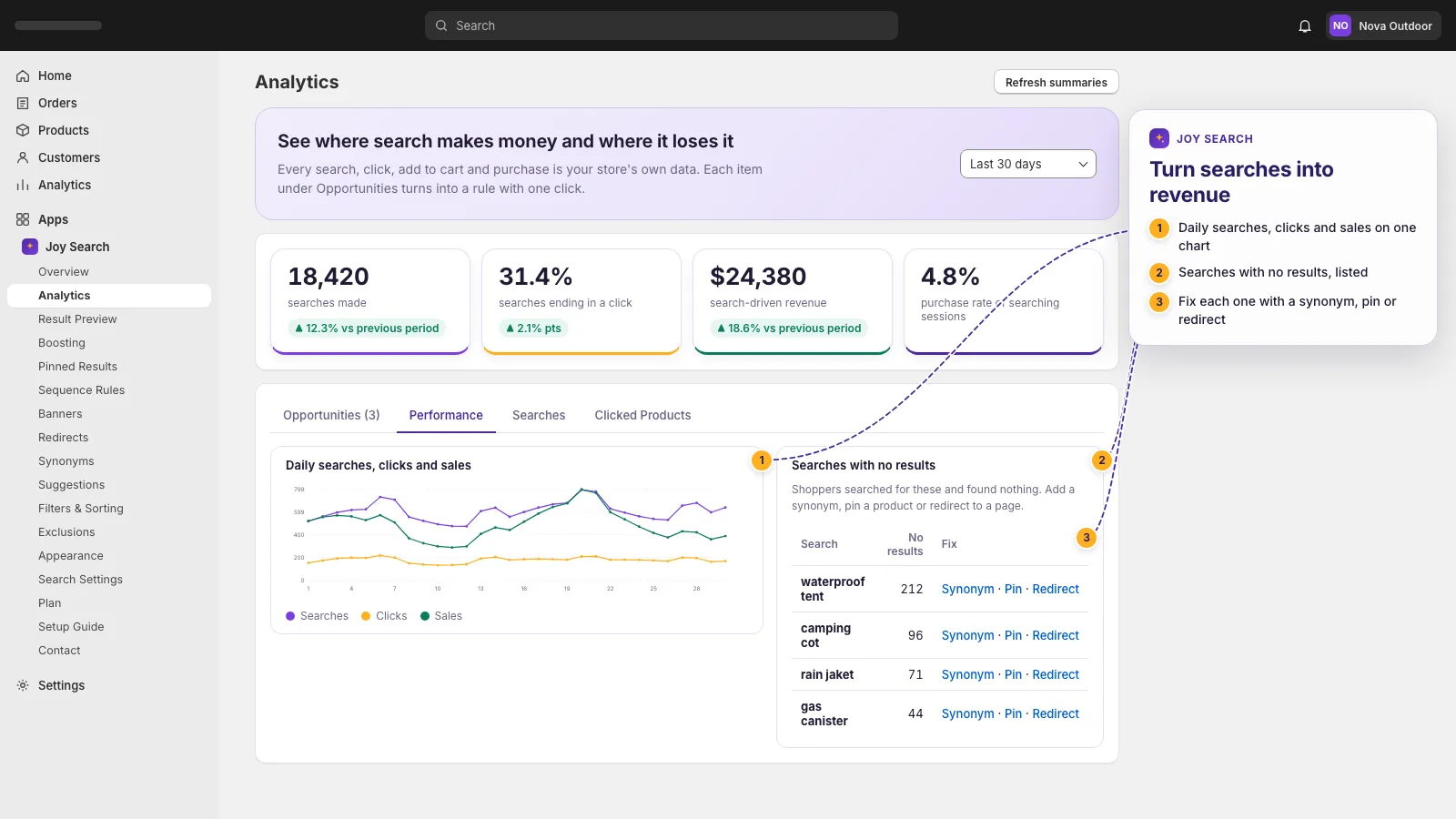
A Shopify Web Pixel ties purchases back to the search that started them. You see which queries sell, which return nothing, and what each fix is worth.
Fixed Price, No Surprise Increases
Three flat monthly plans. Your bill does not grow with your revenue and we do not raise prices on existing subscriptions without notice.
Speaks Your Customers' Language
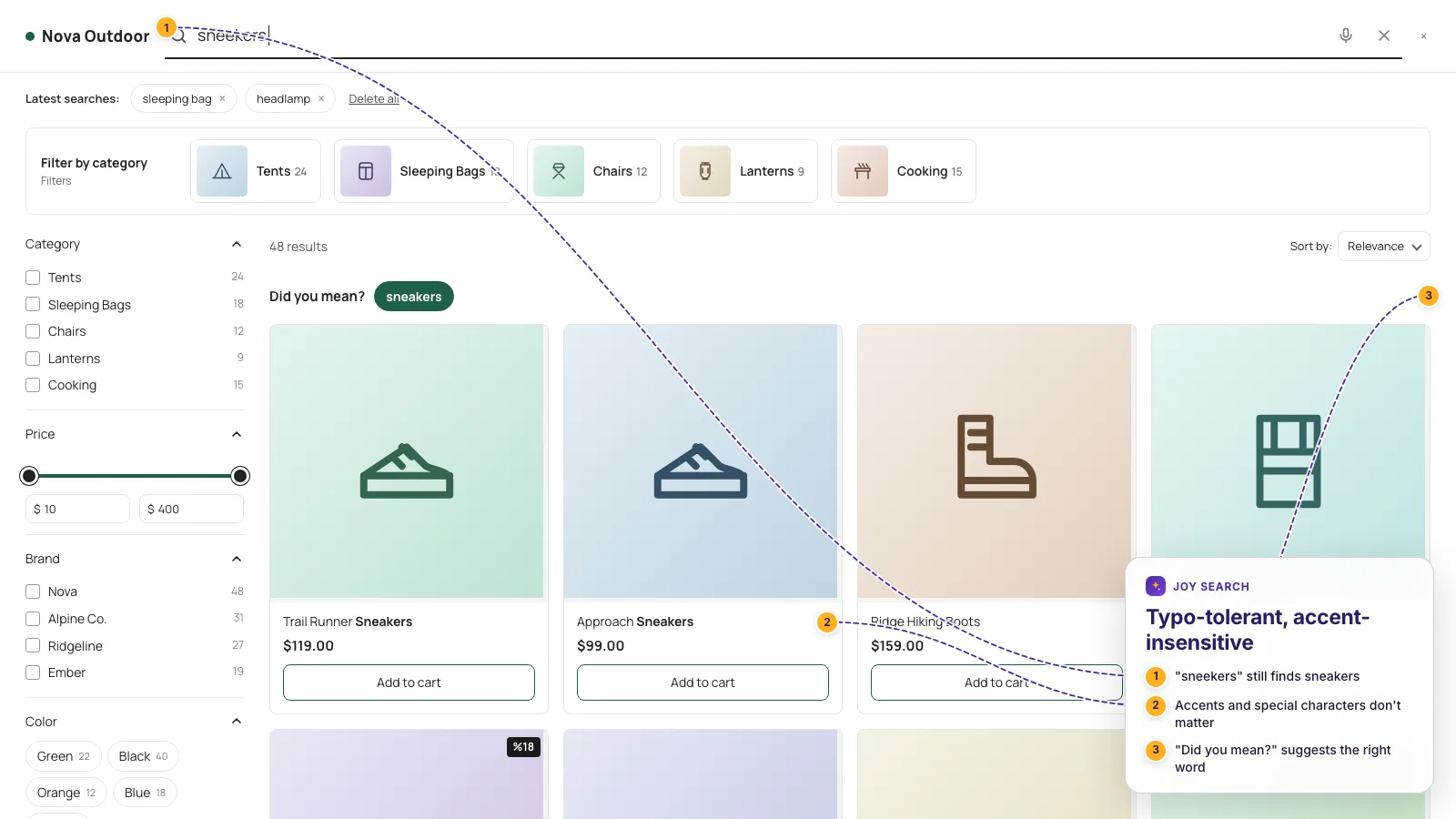
Turkish, German, Spanish and Arabic are handled as first-class languages: accent-insensitive matching, correct casing and language-aware stemming, all in one index for multi-language stores.
Everything a Store Needs to Turn Searches Into Orders
Storefront, merchandising and analytics in one app, managed from Shopify admin.
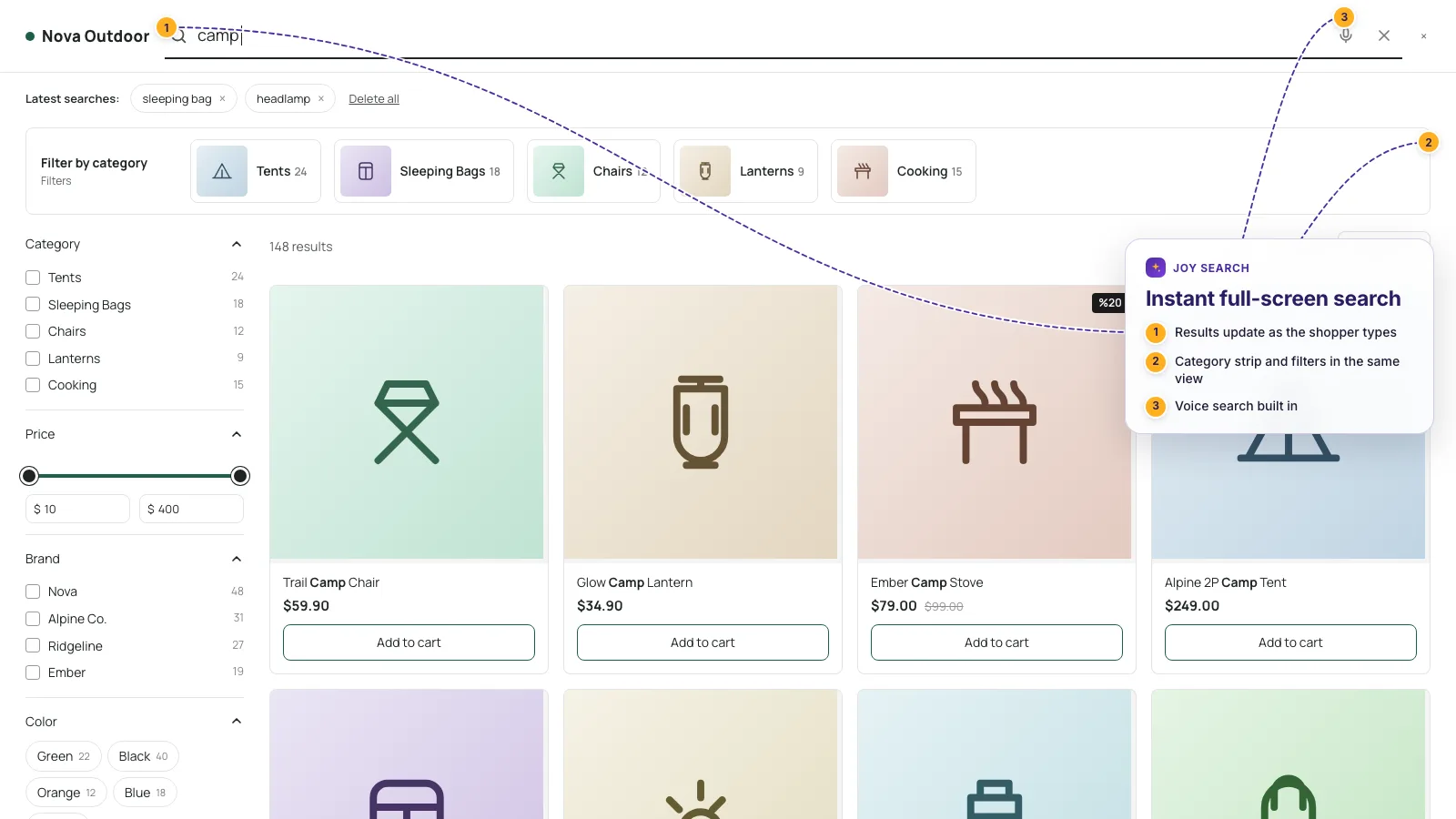
Full-Screen Instant Search
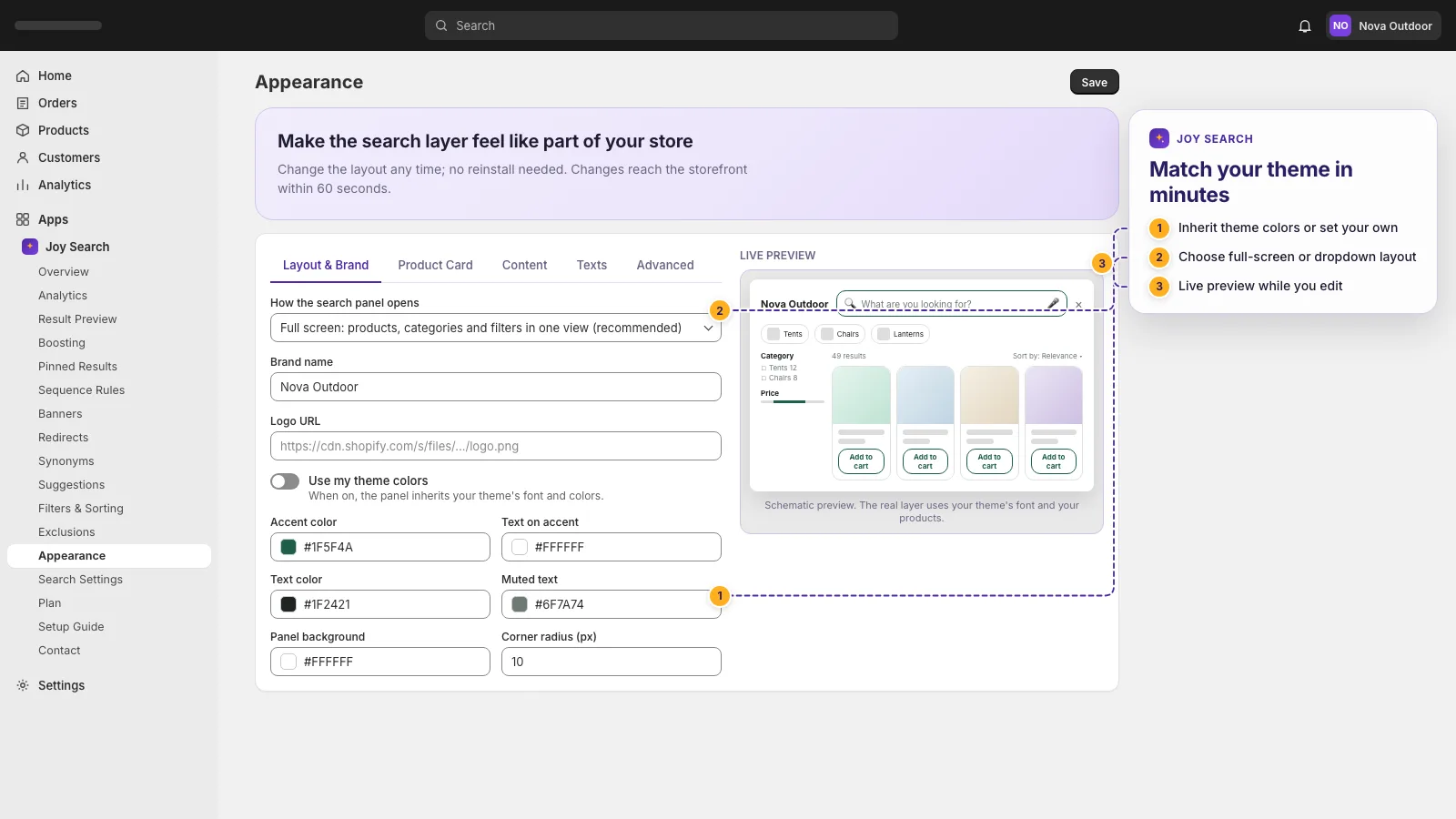
Results appear as customers type: product cards, category strip, popular and recent searches. Choose the full-screen panel or a compact dropdown under the search box.
Typo Tolerance and Accent-Insensitive Matching
"sneekers" finds sneakers, "canta" finds Çanta, "jacke" finds Jacke. SKU and product code searches work with or without dashes.
Turkish, German, Spanish and Arabic Support
Language-aware stemming and synonyms. Multi-language Shopify stores get one index with automatic locale mapping instead of a separate engine per language.
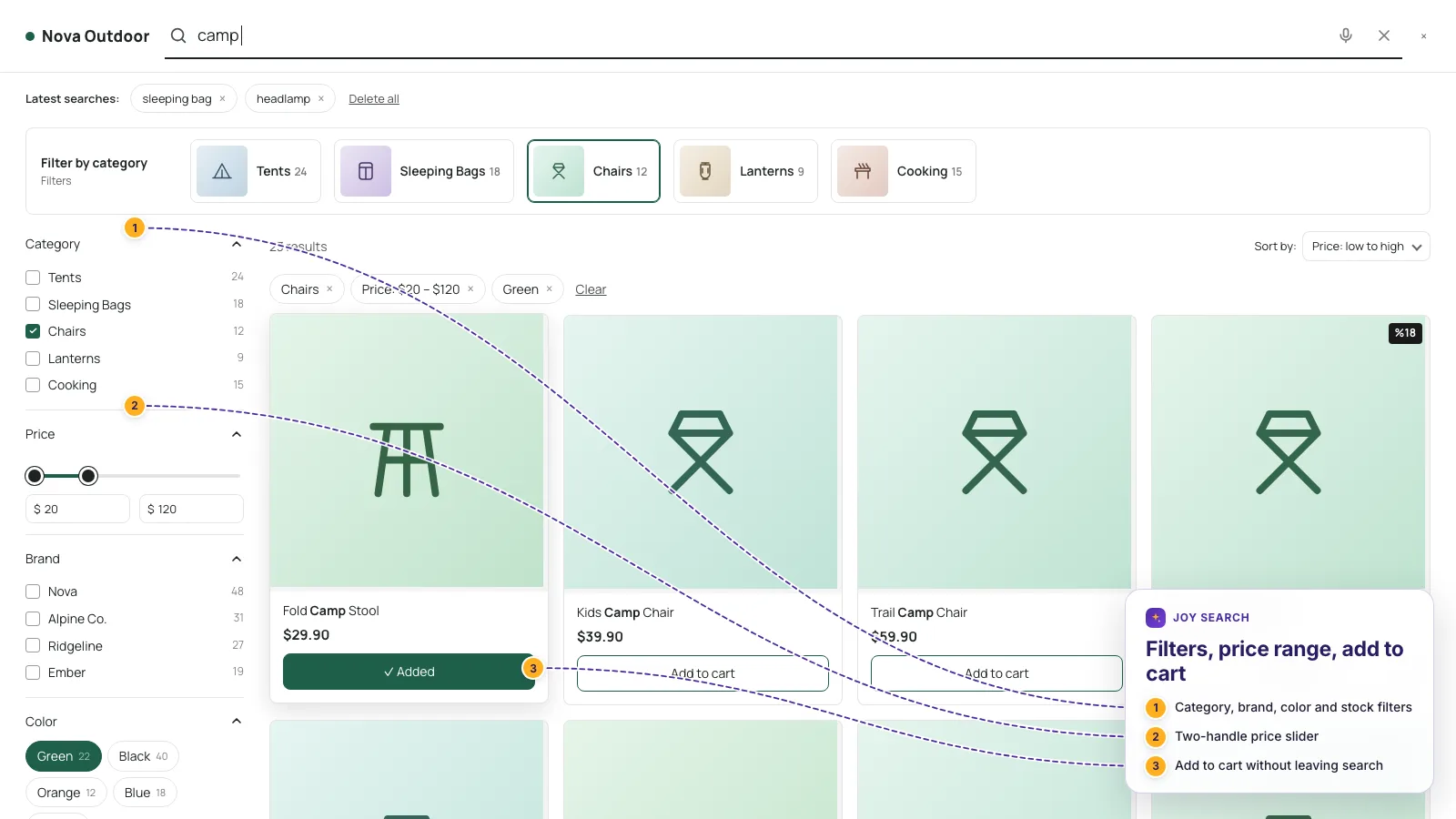
Filters, Sorting and Price Range
Brand, type, tags, variant options, metafields and stock as filters; a two-handle price slider; sorting by relevance, price or newest. All configured from the admin without code.
Voice Search
A microphone in the search box lets mobile shoppers speak their query. Works in the browser, no extra service.
Merchandising Rules
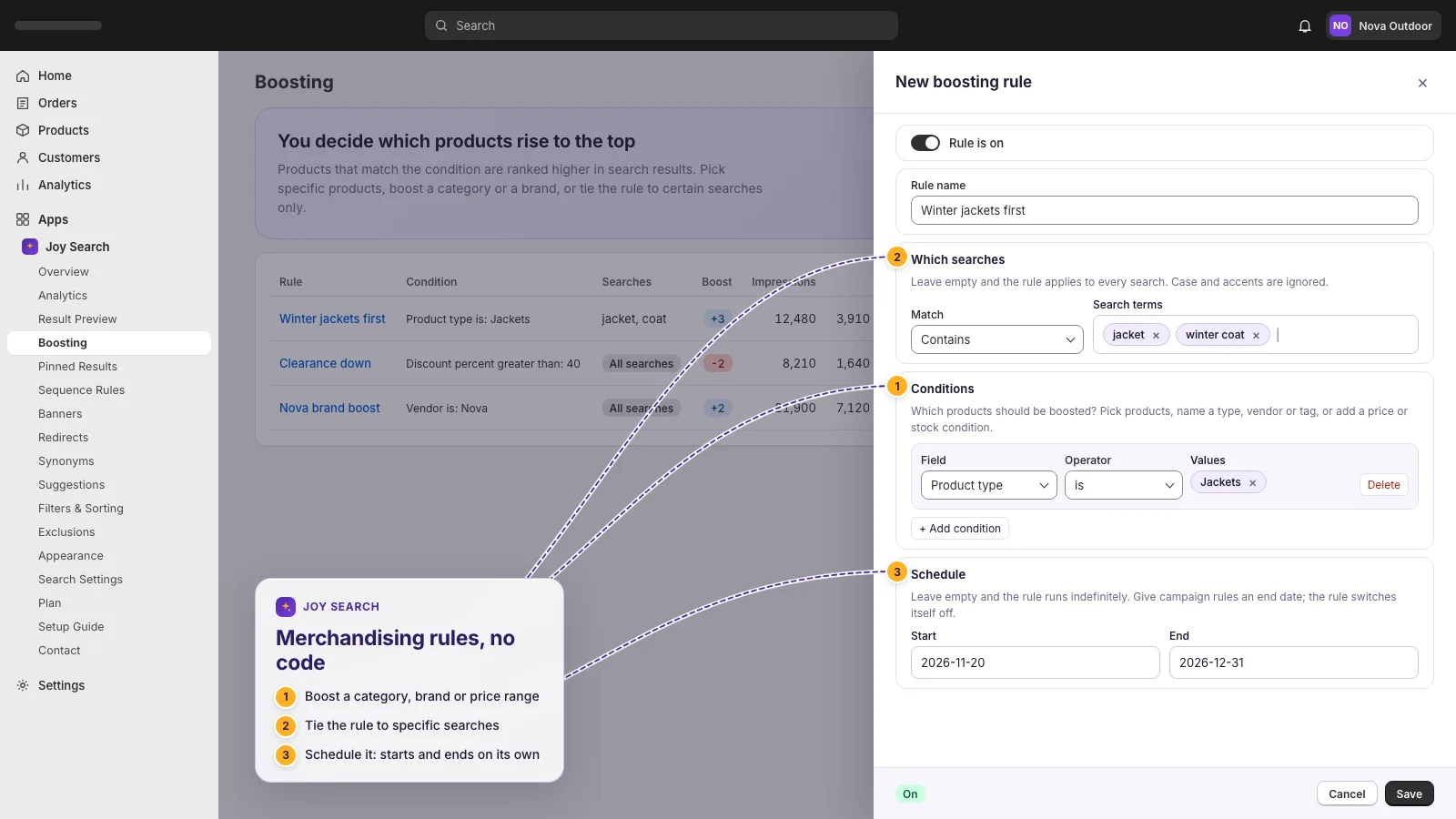
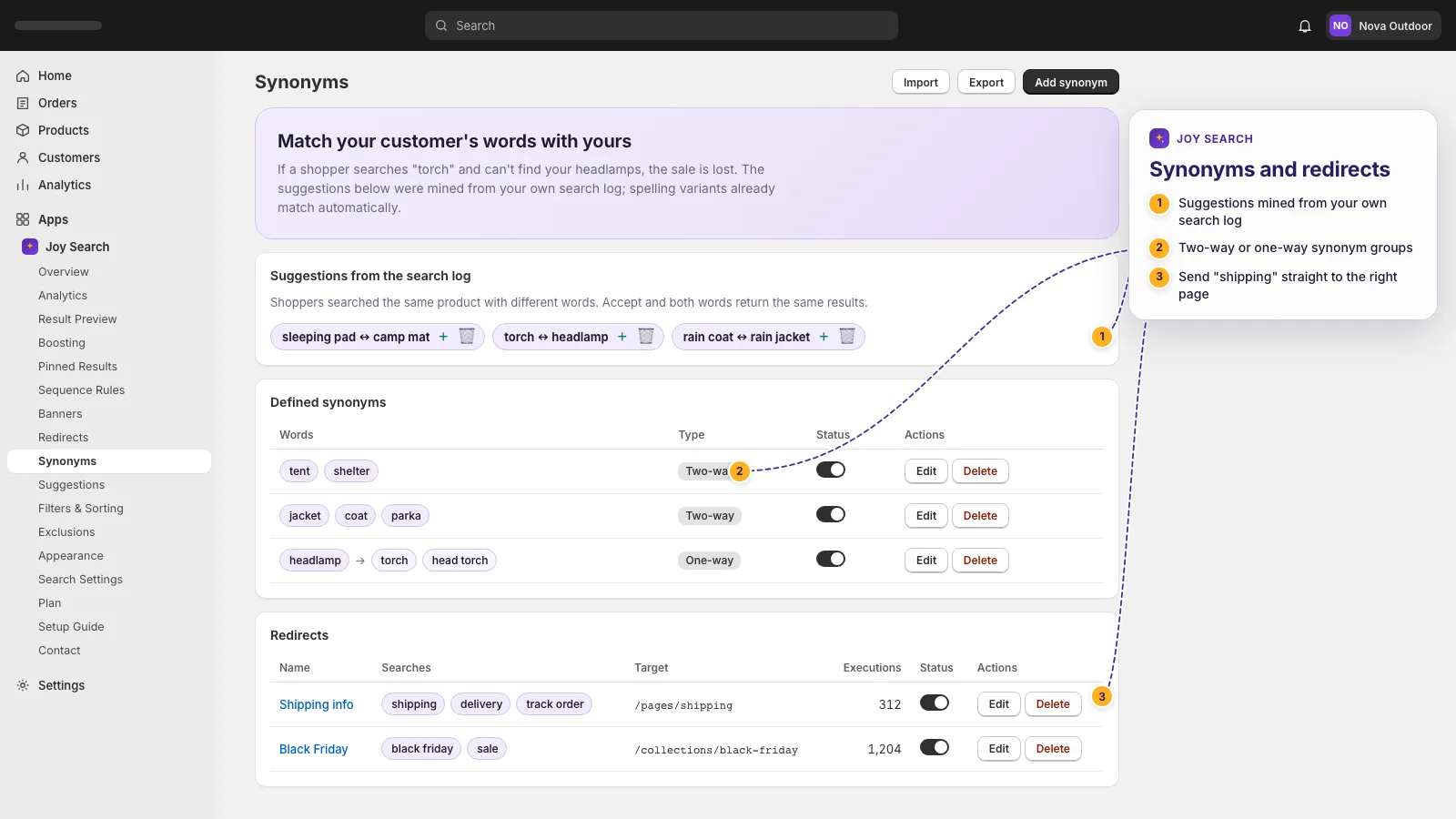
Boost, pin, sequence rules ("mats first, then tank pads"), banners, redirects and synonyms. Each rule explains why it is invalid instead of showing a red label.
Learning Ranking
Clicks, add-to-carts and purchases per query feed back into ranking every day. The result preview shows the relevance, learning and rule scores side by side, so you always know why a product is where it is.
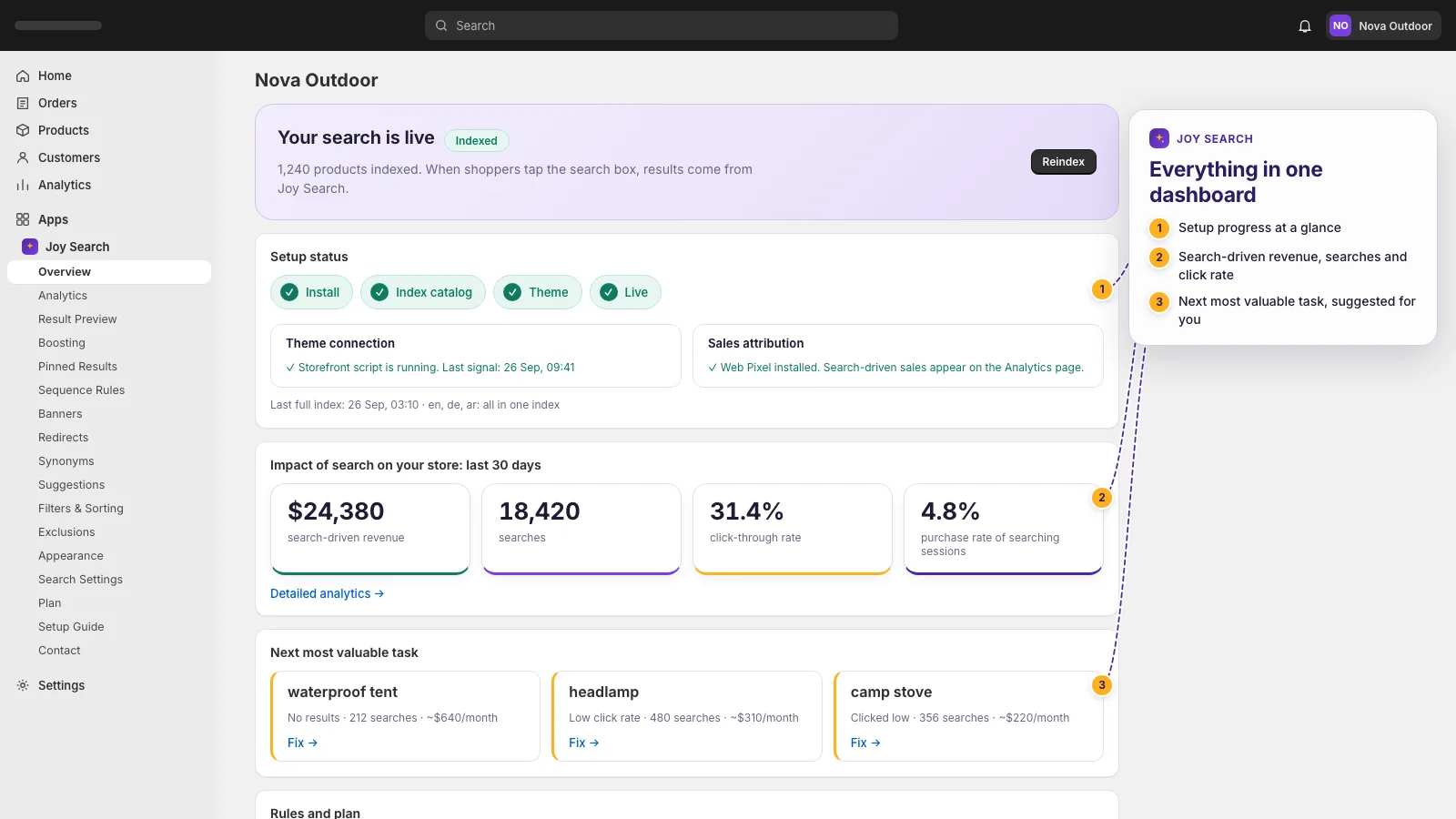
Analytics, Opportunities and Search-Driven Sales
Top searches, zero-result searches, click position and sales attributed to search through a Shopify Web Pixel. Every opportunity opens a pre-filled rule with one click.
No-Code Setup With a Theme App Embed
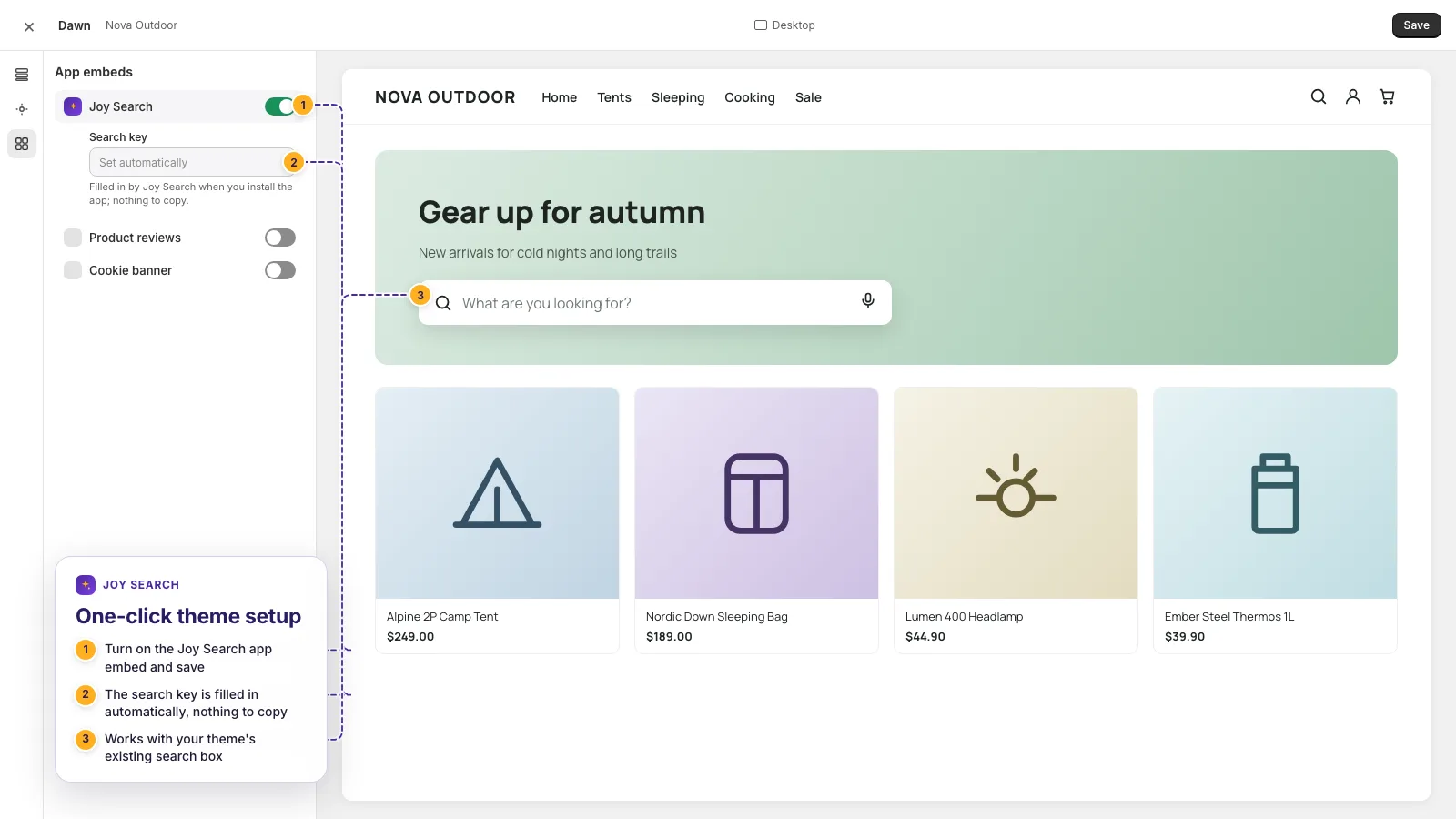
Turn on Joy Search in the theme editor's App embeds and you are live. The search key reaches the theme automatically; nothing to copy, nothing to paste.
Automatic Search Box Detection
Joy Search finds the search icon and input in your theme by itself, including Dawn-style drawers. The dashboard shows whether the theme is connected.
Core Web Vitals Friendly
Zero requests while the page loads; the script is about 17 KB gzipped and wakes up on the first tap into the search box. Your speed scores stay where they are.
Fixed Pricing, One Index for Every Language
Flat monthly plans that do not track your revenue. Multi-language and multi-currency stores run on a single index, so prices and languages stay in sync.
See It Working, on the Storefront and in the Dashboard
From the first keystroke to the sales report. Every screen below is the product itself, shown in your language.
Joy Search in 30 Seconds
The facts a merchant asks first, in one place.
- Platform
- Shopify, all plans; every Online Store 2.0 theme; no Shopify Plus required
- App type
- Storefront search and product discovery (instant search, filters, merchandising, analytics)
- Setup
- Theme app embed with automatic search box detection; no code, no CSS selectors
- Pricing
- Starter $15, Growth $39, Pro $99 per month, fixed; 14-day free trial on every plan
- Languages
- English, Turkish, German, Spanish and Arabic; one index for multi-language stores
- Performance
- Zero requests on page load, about 17 KB gzipped script, Core Web Vitals unaffected
- Customer data
- Read-only catalog scopes; anonymous search events only; no names, emails or payment data
- Hosting
- Dedicated servers in Germany (Hetzner); index deleted within 48 hours after uninstall
- Developer
- Joykek, İstanbul, Türkiye (joykek.com)
- Install
- Shopify App Store listing
Live in Four Steps, Without a Developer
Most stores finish setup in under fifteen minutes. The only manual step is a switch in the theme editor.
Install and Start the Trial
Install from the Shopify App Store and pick a plan. The 14-day trial unlocks every feature so you can judge the whole product before paying.
Index Your Catalog
Joy Search reads your products, collections and stock in one bulk pass and keeps them fresh with webhooks. Drafts and archived products are skipped automatically.
Switch It On in the Theme Editor
Open App embeds in the theme editor and turn on Joy Search. The search box is detected automatically and the dashboard confirms the connection.
Watch the Sales Come In
From day one the analytics show what customers search, what they miss and what search brings to the checkout. Fix the gaps with one-click rules.
Three Flat Plans, One 14-Day Trial
Pick the plan by catalog size and monthly searches. Prices are fixed in USD, billed through Shopify, and you can change or cancel at any time.
- Instant search panel
- Typo-tolerant search
- Accent-insensitive matching
- Product code search
- Filters and sorting
- Synonyms
- Voice search
- Basic analytics, 30 days
- Everything in Starter
- Semantic search
- Image search
- Boost, pin and sequence rules
- Redirects and banners
- Opportunities screen
- 90-day analytics history
- Everything in Growth
- Unlimited products
- Personalized results
- A/B testing
- Recommendation carousels
- Collection page merchandising
- 365-day analytics history
- Priority support
If you pass your monthly search limit, search keeps working for your customers; we simply ask you to move up a plan. Every feature is open during the trial.
Frequently Asked Questions
Anything else? Write to info@joykek.com; we answer within one business day.
Does Joy Search work with my theme?
Do I need Shopify Plus?
How long does setup take?
What happens when I reach my monthly search limit?
Which permissions does the app need and what does it store?
Where is my data hosted?
Can I cancel any time?
My store sells in several languages. Do I need several setups?
I use Doofinder today. How hard is switching?
Will the app slow my store down?
The Setup Guide, as a PDF in Your Language
Every screen with a screenshot, from installation to the first merchandising rule. The same guide is available inside the app under Setup Guide.
Talk to the People Who Built It
Questions before installing, help during setup or a feature you miss: write to us and a person from the Joy Search team replies, usually the same day.
info@joykek.com